
Restoration Proposals & E-Signatures
Build and edit a proposal from the job, then send the customer a secure signing link by text or email. Keep the scope, pricing, terms, signature status, and completed document connected to the same job record.
- Edit line items, quantities, pricing, scope, notes, and terms before sending
- Generate supported proposals from the customer and job record
- Send supported proposals and authorization forms through a secure signature link
- Signed document and signature status stay connected to the job
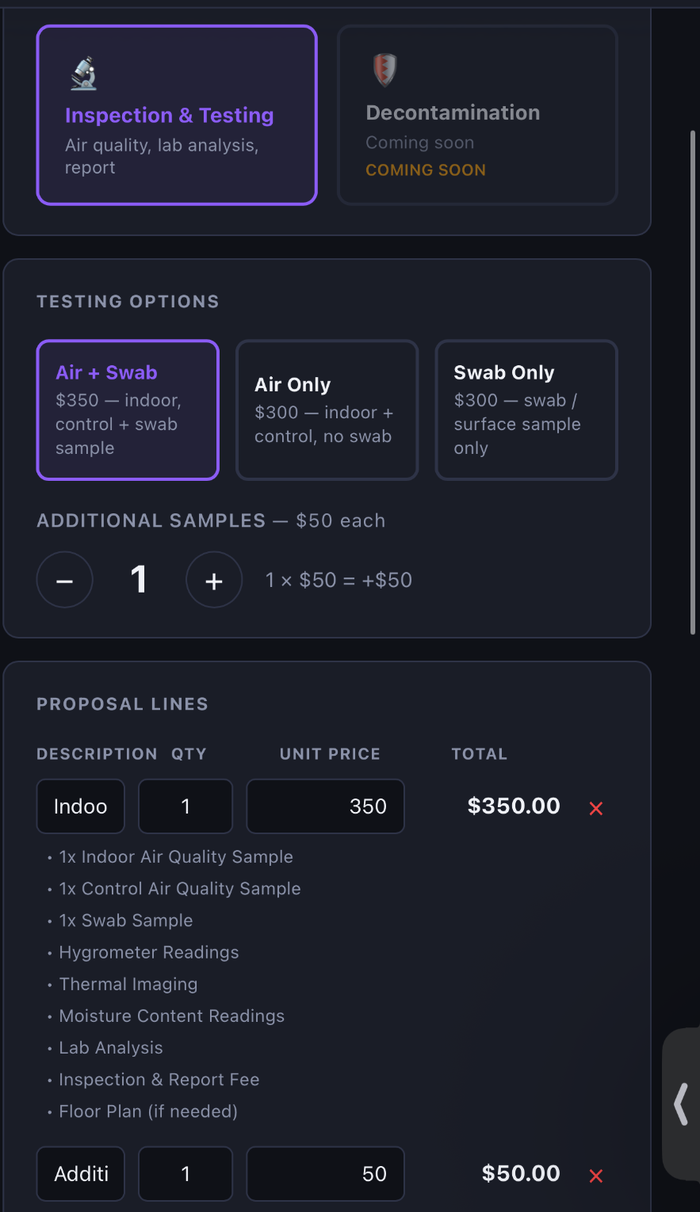
Edit it before the customer ever sees it.
Restoration work changes. Update the scope, pricing, quantities, notes, or terms while the proposal is still a draft, then review the final document before sending it for signature.
Bring your own proposal.
A planned upload-and-sign workflow will let a company upload an existing proposal PDF, visually place the required fields, and send it for signature without asking Restoration Workflow to rebuild the document as a template.
- Upload an existing PDF
- Place signature, initials, printed name, date, text, and checkbox fields
- Move and resize fields visually on any page
- Assign required fields to the customer or company representative
- Preserve the untouched original PDF
- Save the completed signed PDF and signing record with the job
Ask AI to revise the proposal.
A planned proposal assistant will let the user describe a change in plain language, review the proposed edits, and decide whether to apply them.
- “Add containment setup for $650.”
- “Change the deposit to 50%.”
- “Make the scope shorter and easier for the homeowner to understand.”
- “Remove the drywall-replacement section.”
- “Create a change order for the ceiling work.”
AI-proposed changes would require user review and approval before they are applied or sent.
Keep exploring
AI-Assisted Report Drafting
AI drafts a branded, editable inspection report from the evidence already on the job — the restoration professional reviews and approves it before it goes to the customer.
Pipeline Financial Visibility
See what's owed and what's been paid across your pipeline without opening a spreadsheet. Amounts owed and paid are tracked on every job and rolled up per customer.
Post-Remediation Verification & Clearance Documentation
Planned: generate clearance documentation the same way as an inspection report — final readings, photos, clearance sampling, and a summary for the customer and their insurer.
Floor-Plan Annotation
Upload a floor plan and drop pins where you find things — lab samples, visible mold, elevated moisture. The annotated plan flows straight into the report PDF.
Drying & Remediation Calculators
Built-in field math. Psychrometrics & GPP, dehumidifier sizing, air-mover counts per IICRC S500, and a fogging-time calculator that uses your captured square footage.
Job Pipeline & CRM
A visual 13-stage pipeline from Lead to Closed/Paid. One-click stage advance. At-a-glance alerts for emergencies, jobs awaiting lab, and reports waiting to be sent.
Stop running jobs on spreadsheets.
A one-month business pilot is available after company onboarding.