
For mold testing and remediation companies
Mold Remediation Software Built by a Mold Company
Track every sample, keep lab results attached to the job, and put together customer-ready reports the same day you inspect. Built by people who ran mold jobs, not by a generic field-service vendor.
The deepest vertical in Restoration Workflow today — inspections, samples, lab results and reports on one job record.
The mold workflow, on real screens
From samples to signed proposal
Lab results on the job, a report you review and approve, and a proposal the customer signs. Screenshots from the live product.
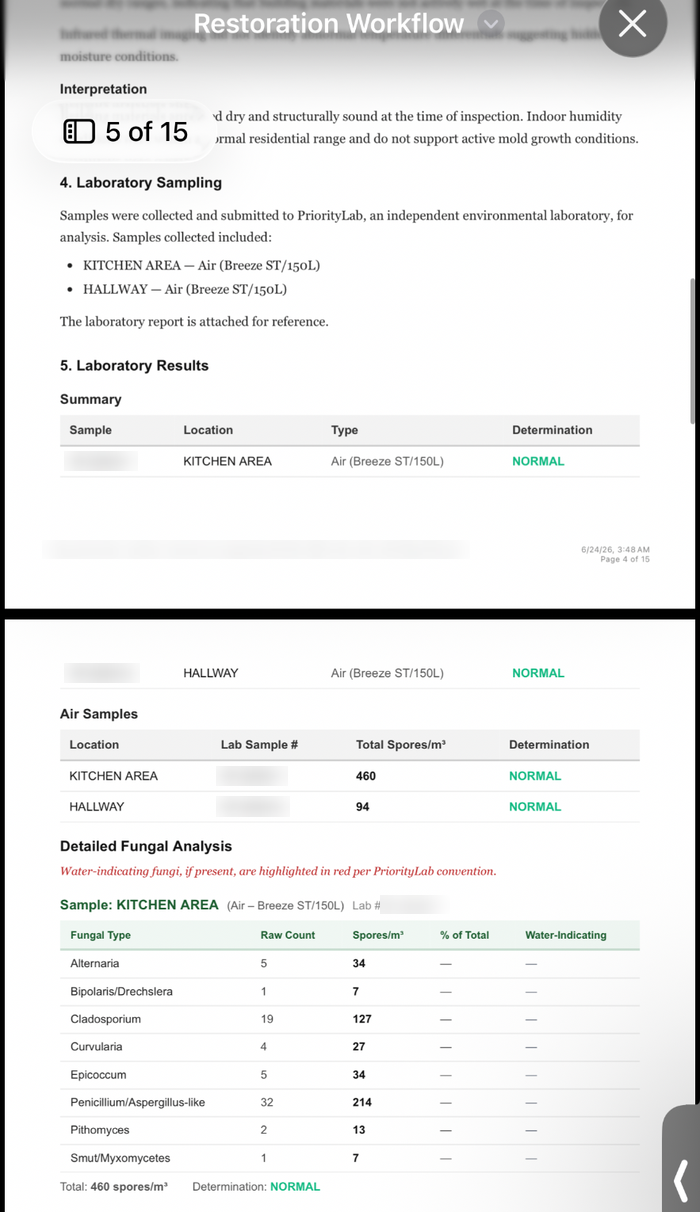
Inspections, mold samples and lab results
Techs document the inspection on their phone: readings, photos by floor, room and category, and mold samples. Supports workflows and reports from common labs including Priority Lab, Hayes Microbial and EMSL.
Mold remediation workflow →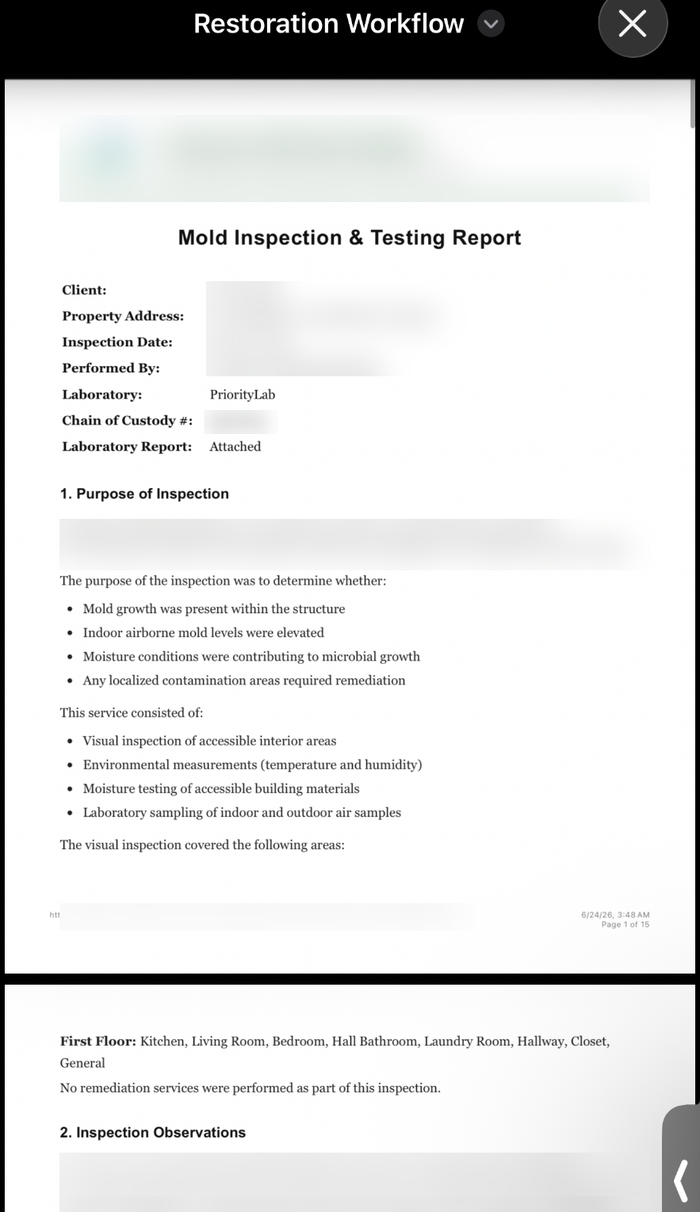
Evidence-backed reports you review
AI drafts a report from the findings, readings, photos and lab data already on the job. You edit and approve it before it goes out. Original lab documents and every revision stay on the job.
See the full workflow →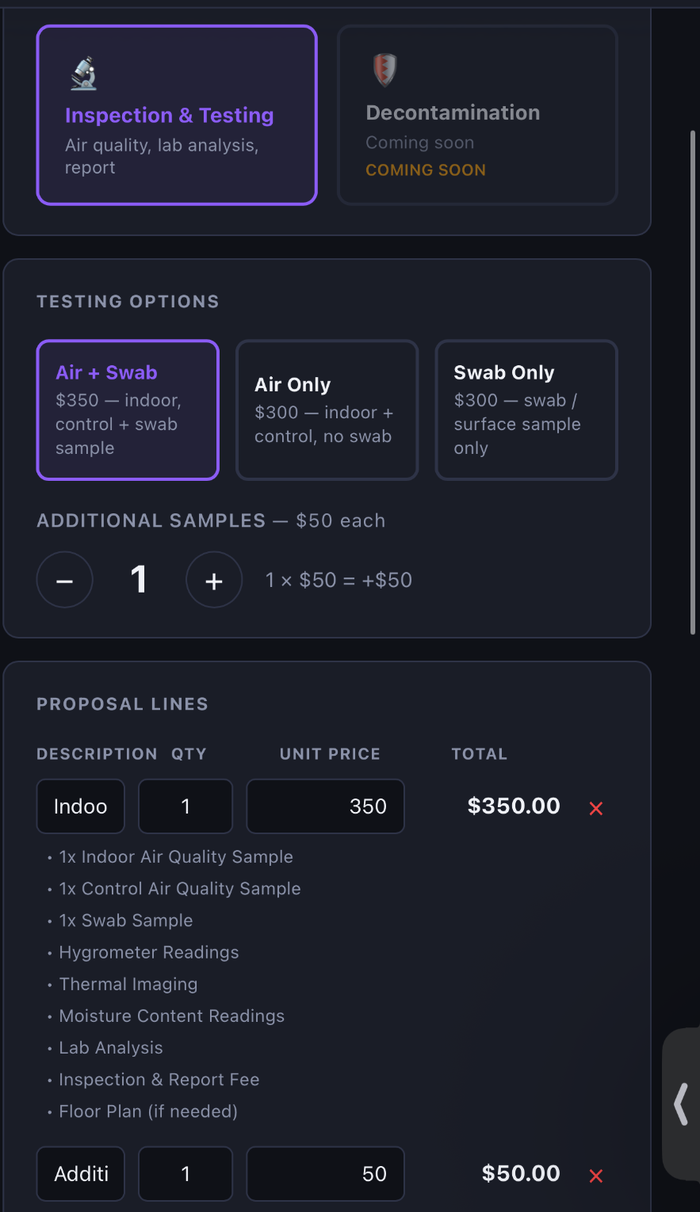
Editable proposals and secure signing
Build from your own templates. Add, duplicate, reorder or remove line items and edit scope, terms, quantities and pricing, then send for secure signature. The signed version is locked.
Proposal software →Why generic CRMs break
What mold remediation crews actually deal with
Three problems we hear in every conversation with a restoration owner — and what fixing them looks like.
Samples get lost between the truck and the lab
Samples get dropped at the lab, results land in someone's inbox three days later, and the customer ghosts. Every sample deserves a record, a submission history, and a clear point where results come back.
Spreadsheets can't hold an inspection together
A mold inspection produces readings, photos, sample locations and lab data that all belong on the same record. A row in Sheets can't connect those pieces. A purpose-built inspection can.
Reports take all weekend
Stitching photos, environmental observations, and lab PDFs into a customer-ready report by hand burns Sundays. Evidence-backed, AI-assisted report drafts — reviewed and approved by a professional before they go out — cut that to minutes.
Built for the work
Features that matter for mold remediation
The capabilities most restoration owners ask about first.
Sample and lab result tracking
Log samples at the time they're taken, with sample type and room. Lab results from Priority Lab, Hayes and EMSL (where supported) attach to the right sample and update the job. Original lab documents are retained on the job record.
Field inspection documentation
Moisture and environmental readings, visible-growth notes, and sample locations captured on the phone during the inspection, not rebuilt from memory at the shop.
Evidence-backed AI report drafting
Draft an inspection report from your inspection notes, photos and lab data. A professional reviews and approves it before it goes to the customer, and every revision is kept in the job's report history.
Photos organized by floor, room and category
Photos attach to the room, floor and finding they document, so a report can be assembled from what's already organized on the job instead of a camera roll.
The workflow
A typical mold remediation job, end to end
Every stage tracked. Every document linked. Nothing falls through.
- 1
Lead and intake
Call, referral or web form captured in about a minute with property, contact, suspected source of moisture and referral source.
- 2
Customer and property record
Every job attaches to a customer and a property, so a repeat call from a landlord opens with the previous inspection and lab history already there.
- 3
Scheduling
Book the inspection while the caller is still on the phone and assign the inspector for the day.
- 4
Inspection
Mobile-first inspection: environmental readings, visible growth notes, containment observations, photos and sample locations, all on a phone.
- 5
Sampling
Air and surface samples logged at sample time with sample type and room.
- 6
Photos
Photos organized by floor, room and category so the finding and the picture stay together.
- 7
Lab submission
Samples tracked as submitted so nothing sits unfollowed while results are pending.
- 8
Lab results
Results attached to the right sample, with the original lab documents retained on the job.
- 9
Report and documents
Evidence-backed report drafted from the readings, photos and lab data already on the job — reviewed and approved by a professional, then edited into a branded, customer-facing document. Revisions are tracked in the job's report history.
- 10
Proposal
Priced remediation scope built from your own templates and line items, sent for a secure electronic signature.
- 11
Remediation and job history
The job, its documents, and its communication history stay on the customer and property record permanently.
In practice
Running mold remediation work day to day
Mold is where Restoration Workflow goes deepest today
The CRM, proposals, field documentation, and reporting platform can support restoration operations across multiple loss types, while mold-specific workflows handle inspections, samples, laboratory results, photos, and customer-ready reports. That is why the pipeline has stages for waiting on lab results, why a sample is a first-class record instead of a note, and why inspection-only and remediation are separate job types.
Sampling and lab tracking as one thread
The expensive failure in mold services is not a bad inspection. It's a sample that went to the lab and nobody chased the result, so the proposal went out nine days later and the customer had already called someone else. Logging samples at the moment they're taken and tying results back to the same sample keeps that thread intact from the crawlspace to the report.
Inspection software a tech will actually use
A restoration inspection has to be completable standing in an attic with one hand free. Structured fields, readings that log on the phone, and photos that attach themselves to the right room and floor. If the inspection tool needs a laptop at the shop, the documentation gets rebuilt from memory.
Coming soon
Expanding mold workflows — coming soon
- Post-remediation verification and clearance reports built into the job record
- Video walkthrough upload with automatic room photo extraction
- Generated floor plans from a walkthrough
- Support for additional mold laboratories beyond Priority Lab, Hayes and EMSL
Not available yet — planned for a future release.
Related
More on this workflow
Common questions
Mold FAQ
What is mold remediation software?
It's a system that runs a mold job end to end: the lead, the property record, the inspection, air and surface sampling, lab result tracking, photos, and the customer-facing report. It differs from general job software because sampling and lab turnaround are part of the workflow rather than notes attached to a work order.
Which labs are supported?
Priority Lab, Hayes and EMSL where supported today. We add more on request.
Does it handle post-remediation clearance?
Not yet. Clearance and post-decon reporting are on the roadmap. Today the platform covers inspection, sampling, lab result tracking, and evidence-backed reporting up through remediation.
Can I run inspection-only jobs and remediation jobs in the same pipeline?
Yes. Inspection-only is its own job type with its own proposal template, and a testing job can turn into a remediation job on the same property record.
Does it work for mold and water jobs in the same account?
Yes. The CRM, proposals, field documentation and reporting support multiple loss types, so a water loss that turns into a mold conversation stays on the same customer and property instead of moving to another system.
Built for mold remediation. Priced for one truck or twenty.
$69/month organization plan. A one-month business pilot is available after company onboarding.
Also built for